Managing customer applications efficiently is crucial for any organization dealing with client data. In this project, we created a full-stack solution using PHP, MySQL, and DataTables. The system allows users to upload Excel files, store them in a database, and view them interactively in a web interface with pagination, search, and sorting.

This blog post will explain how we built it, the challenges we faced, and how we solved them.


1️⃣ Project Overview

  • Tech Stack:
  • Backend: PHP
  • Database: MySQL
  • Frontend Table: jQuery DataTables
  • Server: XAMPP (Local Development)
  • Excel Handling: PhpSpreadsheet
Key Features:

1. Excel file upload to import customer applications

2. MySQL database storage with auto-increment entry_id

3. Interactive DataTables table with server-side processing

4. Smooth pagination, sorting, and global search

5. Horizontal scrolling for wide tables


2️⃣ Database Setup

We created a MySQL database named excel_db and a table customer_applications with columns such as:

  • entry_id (primary key, auto-increment)
  • own_or_rent_property
  • product_inquiry_for
  • customer_name
  • customer_phone
  • customer_email
  • customer_home_address
  • delivery_address
  • employer_name, landlord_name, co_renter_name … and more


3️⃣ File Upload (import.php)

We implemented a file upload form in list.php:

<form action=”import.php” method=”POST” enctype=”multipart/form-data”>
<input type=”file” name=”excel_file” required>
<button type=”submit” name=”import”>Upload Excel</button>
</form>

How Excel is processed:

  • PHP library PhpSpreadsheet reads the uploaded Excel file.
  • Convert each row into an array.
  • Insert into MySQL using prepared statements:

$stmt = $conn->prepare(“INSERT INTO customer_applications (own_or_rent_property, product_inquiry_for, …) VALUES (?, ?, …)”);
$stmt->bind_param(“ss…”, $row[0], $row[1], …);
$stmt->execute();

Key Point: entry_id auto-increments automatically; we don’t insert it manually.


4️⃣ Display Table with DataTables (list.php)

  • We used DataTables plugin for the table.
  • Server-side processing was enabled for large datasets:

$(‘#table’).DataTable({
processing: true,
serverSide: true,
ajax: {
url: “fetch.php”,
type: “POST”
},
scrollX: true,
pageLength: 10,
deferRender: true
});

Why server-side?
  • Efficient handling of large datasets
  • Pagination, search, sorting all handled via AJAX requests


5️⃣ Server-Side Data Fetching (fetch.php)

  • Receives AJAX requests from DataTables.
  • Handles search, pagination, sorting.

$start = intval($_POST[‘start’] ?? 0);
$length = intval($_POST[‘length’] ?? 10);
$search = $_POST[‘search’][‘value’] ?? “”;

$sql = “SELECT * FROM customer_applications”;
if (!empty($search)) {
$sql .= ” WHERE customer_name LIKE ‘%$search%’ OR customer_email LIKE ‘%$search%’ …”;
}

$totalQuery = $conn->query(“SELECT COUNT(*) AS total FROM customer_applications”);
$totalRecords = $totalQuery->fetch_assoc()[‘total’];

$filteredQuery = $conn->query($sql);
$totalFiltered = $filteredQuery->num_rows;

$sql .= ” LIMIT $start, $length”;
$dataQuery = $conn->query($sql);

$data = [];
while ($row = $dataQuery->fetch_assoc()) {
$data[] = [
$row[‘entry_id’],
$row[‘own_or_rent_property’],
$row[‘product_inquiry_for’],
$row[‘customer_name’],

];
}

echo json_encode([
“draw” => intval($_POST[‘draw’]),
“recordsTotal” => $totalRecords,
“recordsFiltered” => $totalFiltered,
“data” => $data
]);

Key Points:
  • draw parameter must match request
  • recordsTotal and recordsFiltered are essential for pagination
  • data array contains actual rows


6️⃣ Errors We Faced and Their Solutions

a) Entry ID Not Showing Properly

  • Problem: Table showed 1,2,3… instead of database entry_id
  • Solution: Use $row[‘entry_id’] in fetch.php instead of DataTables default row index


b) Invalid JSON Response

  • Problem: DataTables threw “Invalid JSON”
  • Cause: PHP warnings/notices, wrong column names
  • Solution:
  • Disable errors for production:
  • error_reporting(0);
    ini_set(‘display_errors’, 0);
  • Ensure no extra output before json_encode()


c) Loading Spinner Stuck

  • Problem: Spinner stays visible even after data loads
  • Cause: draw value mismatch or JSON incorrect
  • Solution:
  • Return correct JSON structure
  • Use deferRender: true in DataTables
  • Optionally hide spinner via CSS:
  • .dataTables_processing { display: none !important; }


d) Pagination Issue (Server-Side / WordPress Style)

  • Problem: Pagination broke, last page rows missing or duplicates
  • Cause: $start / $length miscalculation or WordPress paged parameter missing
  • Solution:
  • $start = intval($_POST[‘start’] ?? 0);
    $length = intval($_POST[‘length’] ?? 10);
    $sql .= ” LIMIT $start, $length”;
  • Ensure JSON returns proper recordsTotal and recordsFiltered
  • For WordPress, set paged in WP_Query correctly


e) Git / GitHub Errors

  • Problems:
  • remote origin already exists
  • repo.git not found
  • Fatal error: build checkout not url found
  • Solutions:
  • git remote remove origin
    git remote add origin https://github.com/yourusername/excel_customer_app.git
    git branch -M main
    git add .
    git commit -m “Initial commit”
    git push -u origin main
  • Use PAT for private repositories


7️⃣ Lessons Learned

1. Always match DB columns with code (search / fetch queries)

2. Server-side pagination and search are efficient for large datasets

3. PHP notices can silently break AJAX JSON responses

4. GitHub workflow: remote set, branch rename, PAT usage

5. Defer rendering in DataTables improves UX


8️⃣ Project Workflow Summary

1. Upload Excel → import.php reads and inserts into DB

2. Database → customer_applications stores all records with unique entry_id

3. Display Table → list.php + DataTables fetch data via AJAX

4. AJAX fetch → fetch.php handles pagination, search, sorting

5. User Interaction → Smooth scroll, search, pagination, horizontal scroll


9️⃣ Future Enhancements

Column-wise filters

Edit / Delete rows in table

Export table to Excel / PDF

Authentication and secure login


Conclusion

This project demonstrates a complete Excel → PHP → MySQL → DataTables pipeline:

Large datasets are handled efficiently

Users can upload, view, search, and paginate data easily

All common errors are addressed: ID issues, JSON errors, spinner loading, pagination, GitHub issues
JavaScript OOPS – Object Oriented Programming System


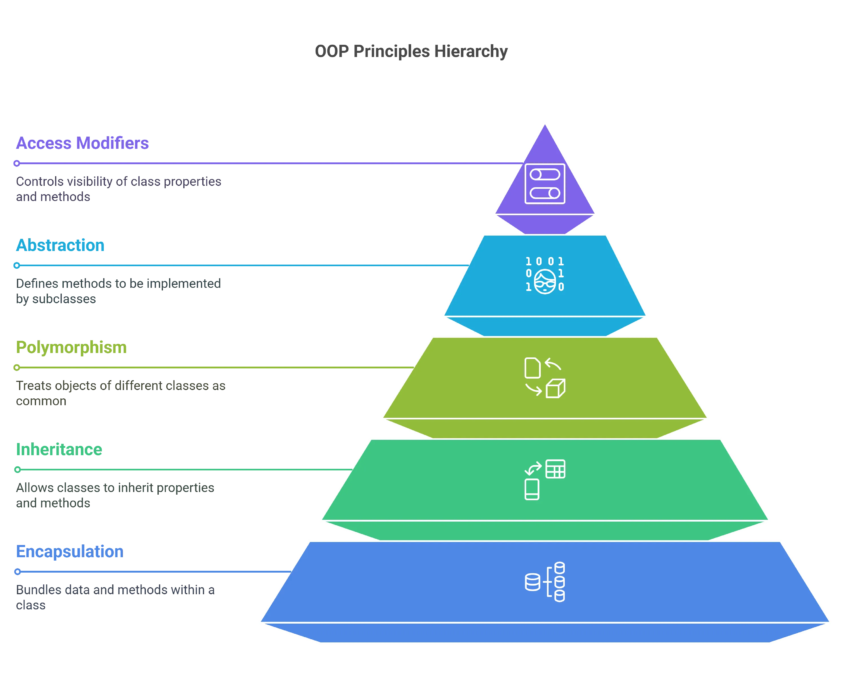
📘 What is OOPS?

  • OOPS stands for Object Oriented Programming System.
  • In simple words, OOPS is a way of writing code where we group data and functions together using objects.

👉 OOPS helps us write clean, organized, and reusable code.


🔹 Why Use OOPS in JavaScript?

✅ Code becomes easy to manage

✅ Reusability of code

✅ Better structure

✅ Used in real-world projects

✅ Makes applications scalable


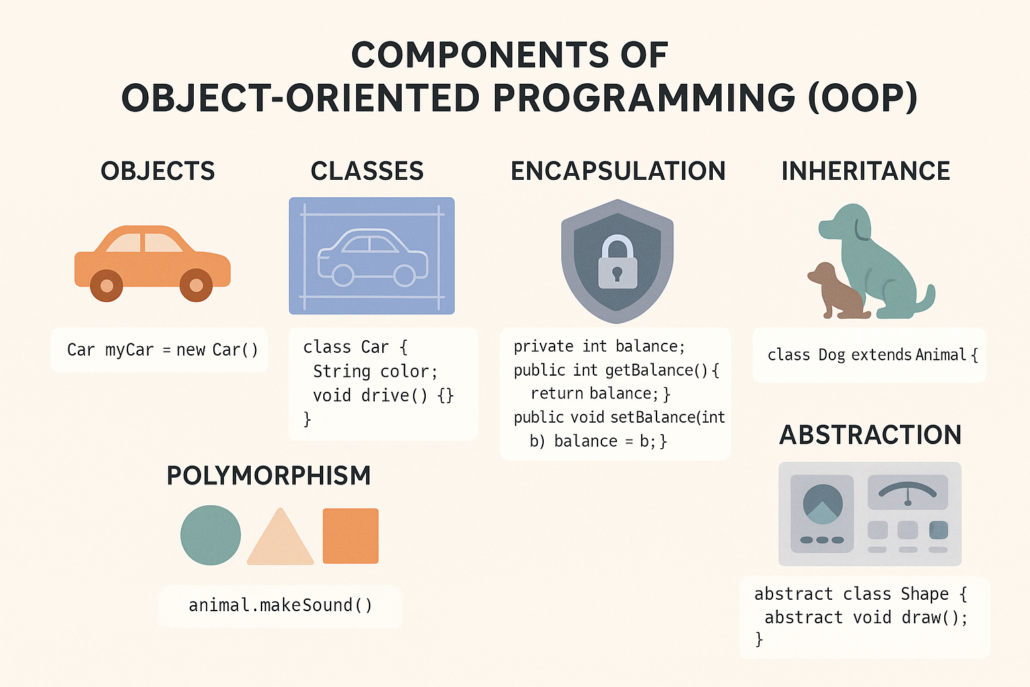
🔹 What is an Object?

  • An object is a real-world entity.

Example:

  • Car
  • Student
  • User
Example Object in JavaScript
let user = {
name: “Shivam”,
age: 21
};

🔹 What is a Class?

  • A class is a blueprint of an object.
  • In simple words, a class defines how an object will look and behave.


Example Class in JavaScript
class User {
constructor(name, age) {
this.name = name;
this.age = age;
}
}


🔹 What is Constructor?

  • A constructor is a special function that runs automatically when an object is created.


Constructor Example
class User {
constructor(name) {
this.name = name;
}
}
let u1 = new User(“Shivam”);


🔹 What is Inheritance?

  • Inheritance means one class uses properties of another class.

👉 Child class inherits from parent class.


Inheritance Example
class Person {
greet() {
console.log(“Hello”);
}
}
class Student extends Person {}
let s1 = new Student();
s1.greet();


🔹 What is Encapsulation?

  • Encapsulation means hiding data and showing only required information.
  • It helps protect data.
  • (Simple explanation is enough for beginners)


🔹 What is Polymorphism?

  • Polymorphism means same function name, different behavior.
  • It improves flexibility in code.

🔹 Advantages of JavaScript OOPS

  • Cleaner code
  • Easy debugging
  • Reusable components
  • Better project structure


📌 Conclusion

  • JavaScript OOPS helps us write professional-level code.
  • Using:
  • Class
  • Object
  • Constructor
  • Inheritance


AJAX Basics – Load Data Without Refreshing the Page


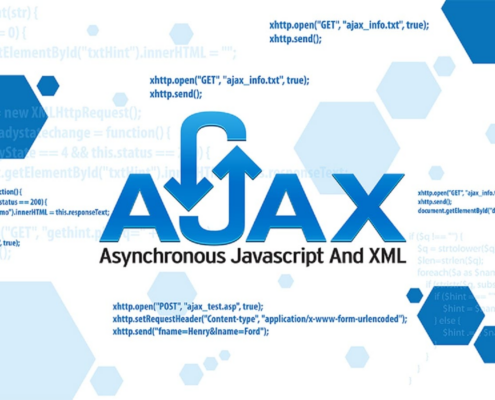
📘 What is AJAX?

  • AJAX stands for Asynchronous JavaScript and XML.
  • In simple words, AJAX allows us to send and receive data from server without reloading the web page.

👉 The page stays the same, only data changes.

🔹 Why Use AJAX?

✅ No page reload

✅ Faster response

✅ Better user experience

✅ Smooth website interaction


🔹 Where AJAX is Used?

  • Login systems
  • Search suggestions
  • Live form validation
  • Weather apps
  • Chat applications


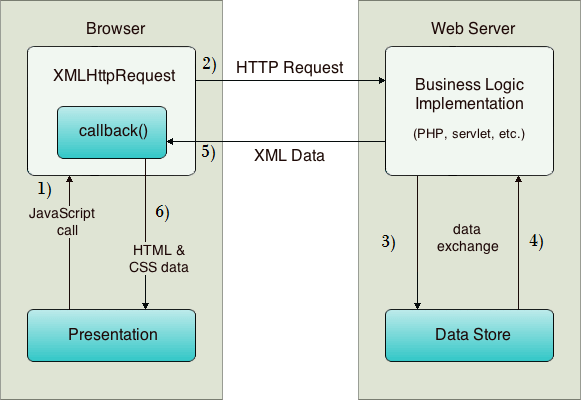
🔧 How AJAX Works (Easy Steps)

1️⃣ User performs an action (click / submit)
2️⃣ JavaScript sends request to server
3️⃣ Server sends data back
4️⃣ Page updates without reload


🔹 Simple AJAX Example (Using Fetch)

fetch(“data.json”)
.then(response => response.json())
.then(data => {
console.log(data);
});

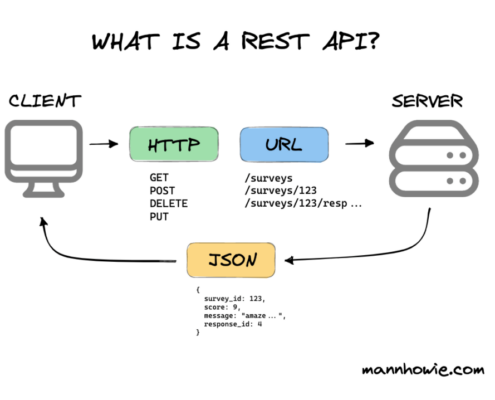
What is an API?

  • API stands for Application Programming Interface.
  • In simple words, an API is a bridge that helps two applications talk to each other

👉 Example:

  1. Weather app gets data from weather server
  2. Payment app talks to bank server

🔹 Real Life Example of API

  • Google Maps
  • Weather apps
  • Payment gateways
  • Login with Google/Facebook.


🔹 API Call Example

fetch(“https://api.example.com/data”)
.then(response => response.json())
.then(result => {
console.log(result);
});

🔹 Display API Data on Page

fetch(“https://api.example.com/data”)
.then(res => res.json())
.then(data => {
document.getElementById(“output”).innerHTML = data.name;

});


🔹 Types of API Requests

  1. GET → Get data
  2. POST → Send data
  3. PUT → Update data
  4. DELETE → Delete data

Advantages of AJAX & API

  1. Faster websites
  2. No full page reload
  3. Dynamic content
  4. Better user experience

🔗 My AJAX & API Project

👉 Live Project Link:
https://thakarshivam175.github.io/Currency-Converter/

https://thakarshivam175.github.io/Weather-App-by-SHIVAM/

📌 Conclusion

  • AJAX and API help us create modern and dynamic websites.
  • AJAX → Handles background requests
  • API → Provides data


Bootstrap Basics – Build Responsive Websites Faster


📘 What is Bootstrap?

  • Bootstrap is a CSS framework.
  • In simple words, Bootstrap gives us ready-made CSS classes so we don’t have to write CSS again and again.

👉 Bootstrap helps us create responsive websites quickly.


🔹 Why Use Bootstrap?

✅ Fast development

✅ Mobile-first design

✅ Pre-built components

✅ Easy to learn

✅ Responsive by default


🔹 Bootstrap Features

  • Grid system
  • Buttons
  • Navbar
  • Forms
  • Cards
  • Modals


🔹 Bootstrap Grid System (Easy)

Bootstrap divides screen into 12 columns.

Example:

<div class=”row”>
<div class=”col-md-6″>Left</div>
<div class=”col-md-6″>Right</div>
</div>


🔹 Bootstrap Button Example

<button class=”btn btn-primary”>Click Me</button>


🔹 When to Use Bootstrap?

  • College projects
  • Admin panels
  • Fast UI design
  • Beginner projects


Tailwind CSS Basics – Utility First CSS Framework


📘 What is Tailwind CSS?

  • Tailwind CSS is a utility-first CSS framework.
  • In simple words, Tailwind lets us style directly in HTML using classes.

👉 We don’t write CSS files again and again.


🔹 Why Use Tailwind CSS?

✅ Custom design

✅ Fast styling

✅ No unused CSS

✅ Modern UI

✅ Highly flexible


🔹 Tailwind CSS Example

<button class=”bg-blue-500 text-white px-4 py-2 rounded”>
Click Me
</button>


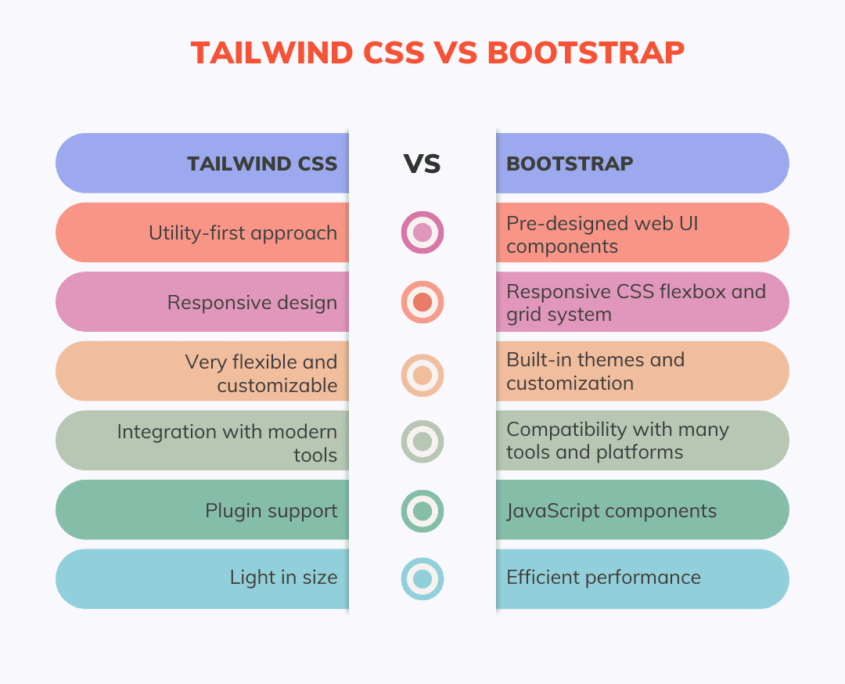
🔹 Tailwind vs Bootstrap (Easy)

Bootstrap Tailwind

Pre-designed components Utility classes
Less customization Full customization
Faster for beginners Better for custom UI

🔹 When to Use Tailwind?

  • Custom design projects
  • Modern websites
  • React / Vue projects
  • Professional UI work


🔗 My Project Links

👉 Bootstrap Project:
https://silver-flan-41aaed.netlify.app/


👉 Tailwind Project:
https://thakarshivam175.github.io/tailwindcss/


📌 Conclusion

  • Bootstrap and Tailwind CSS both help in faster web design.
  • Bootstrap → Quick & easy
  • Tailwind → Custom & modern

HTML Basics – Structure of a Web Page


📘 What is HTML?

HTML stands for HyperText Markup Language.
HTML is used to create the structure of a website.

In simple words, HTML tells the browser:

  • What is heading
  • What is paragraph
  • What is image
  • What is form

👉 HTML is the skeleton of a website.

🔹 Common HTML Tags

  • <h1> to <h6> – Headings
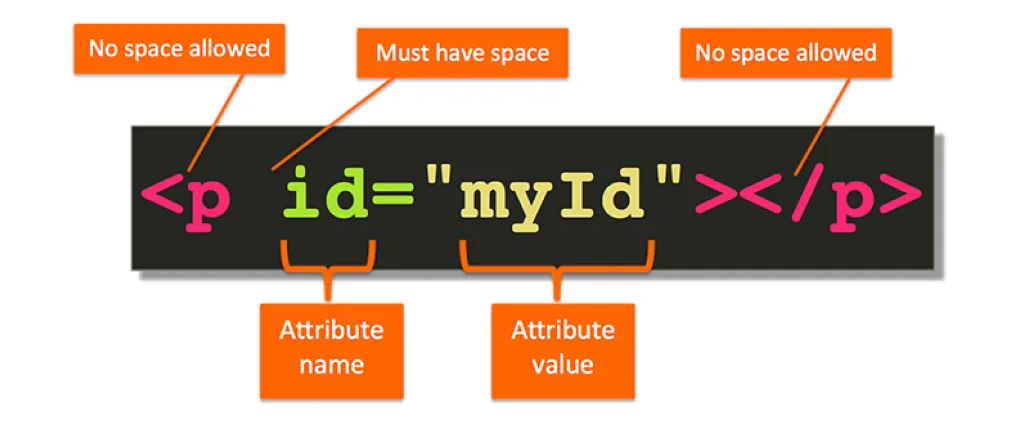
  • <p> – Paragraph
  • <a> – Link
  • <img> – Image
  • <div> – Container
  • <form> – Form


🔹 Simple HTML Example

<h1>Welcome</h1>
<p>This is my first website</p>

🔹 Why HTML is Important?

  • Creates page structure
  • Easy to learn
  • Required for all websites
  • Works with CSS & JavaScript

CSS Basics – Styling the Web Page


📘 What is CSS?

CSS stands for Cascading Style Sheets.
CSS is used to design and style the website.

In simple words, CSS makes websites:

  • Colorful
  • Beautiful
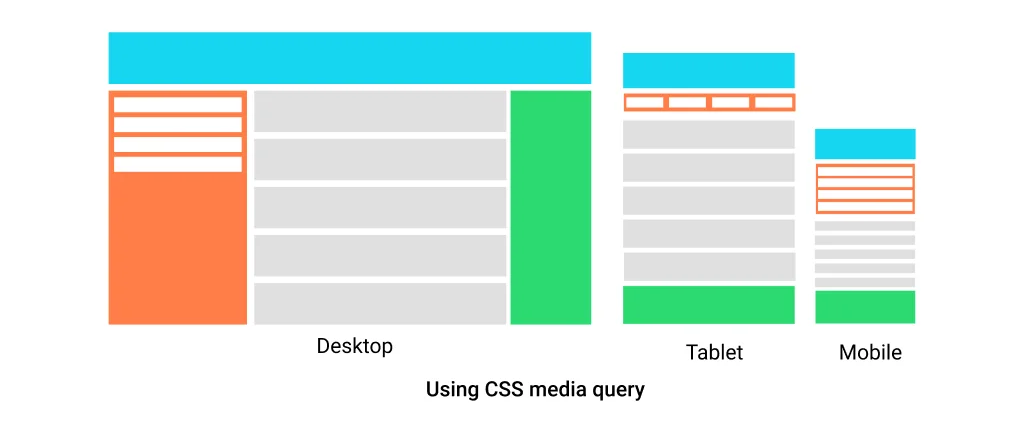
  • Responsive

🔹 What CSS Can Do?

  • Change colors
  • Change fonts
  • Add spacing
  • Create layouts
  • Make website responsive


🔹 Simple CSS Example

h1 {
color: blue;
text-align: center;
}


🔹 Types of CSS

1️⃣ Inline CSS
2️⃣ Internal CSS
3️⃣ External CSS (recommended)


🔹 Why CSS is Important?

Makes website attractive

Improves user experience

Helps in responsive design


JavaScript Basics – Making Websites Interactive


📘 What is JavaScript?

JavaScript is a programming language for the web.
JavaScript makes websites interactive and dynamic.

In simple words, JavaScript adds:

  • Logic
  • Actions
  • Behavior

🔹 What JavaScript Can Do?

Show alerts

Validate forms

Handle button clicks

Change content dynamically

Call APIs


🔹 Simple JavaScript Example

alert(“Hello World”);


🔹 JavaScript Used For

  • Login validation
  • Form validation
  • Dynamic content
  • Animations
  • API calls

🔗 My Project Link:

👉 HTML/CSS/JS Project:
https://thakarshivam175.github.io/Sundown-studio/

 Conclusion:

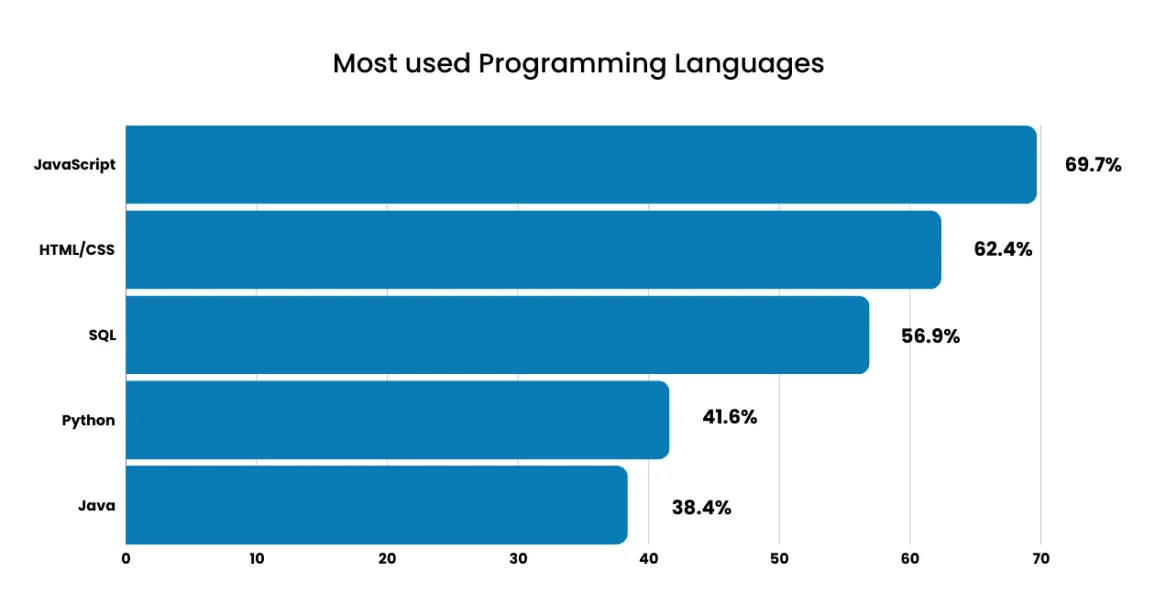
  • HTML, CSS, and JavaScript are the core technologies of web development.
  • HTML → Structure
  • CSS → Design
  • JavaScript