

What is WordPress?

WordPress is a Content Management System (CMS).

In simple words, WordPress helps us create websites without writing much code.

Using WordPress, we can easily:

Create pages

Write blog posts

Upload images

Manage content


πŸ”Ή Why WordPress is Popular?

WordPress is popular because:

βœ… Easy to use

βœ… No coding required (basic level)

βœ… Free and open-source

βœ… Thousands of themes & plugins

βœ… SEO friendly


πŸ”Ή Types of WordPress

1️⃣ WordPress.com

Hosting is already provided

Limited control

Good for beginners

2️⃣ WordPress.org

Self-hosted

Full control

Used for professional websites

πŸ”Ή What Can We Build Using WordPress?

Using WordPress, we can create:

πŸ“ Blog websites

🏒 Business websites

πŸ§‘β€πŸ’Ό Portfolio websites

πŸ›’ E-commerce websites

πŸ“° News websites


πŸ”Ή Important WordPress Terms (Easy)

πŸ“„ Pages

Used for static content
Example: Home, About, Contact

πŸ“ Posts

Used for blogs and daily content
Example: Articles, News, Tutorials

🎨 Themes

Themes control the design and layout of the website.

Example:

Colors

Fonts

Page layout


πŸ”Œ Plugins

Plugins add extra features to WordPress.

Example:

Contact Form

SEO

Security

Page Builders


πŸ”§ Basic Steps to Create Website in WordPress

1️⃣ Install WordPress
2️⃣ Login to admin panel
3️⃣ Choose a theme
4️⃣ Install required plugins

5️⃣ Create pages & posts

6️⃣ Publish website

πŸ”Ή Advantages of WordPress

βœ” Beginner friendly

βœ” Mobile responsive themes

βœ” Large community support

βœ” Easy updates

βœ” Secure with plugins

Conclusion:

WordPress is the best platform for beginners to start web development.
It helps us build professional websites easily and quickly.

Learning WordPress is a great skill for freelancing, internships, and jobs
1. Git Basics

πŸ”Ή What is Git?

Git is a version control system.
In simple words, Git remembers every change you make in your code.

If:

Your code breaks.

You delete something by mistake.


πŸ”Ή Why Git is Important?

Git is important because:

βœ… Keeps backup of your code

βœ… Tracks who changed what and when

βœ… Helps in team work

βœ… Saves project history

βœ… Used by almost all companies


πŸ”Ή What is GitHub?

GitHub is an online platform where we store Git projects on the internet.

In simple words:

Git β†’ works on your computer

GitHub β†’ stores your code online

Using GitHub, you can:

Share code with others

Show your work to companies

Work with team members


πŸ”Ή Difference Between Git and GitHub

Works locally Works online
Tracks code changes Stores code
Command-line tool Website
No internet needed Internet required


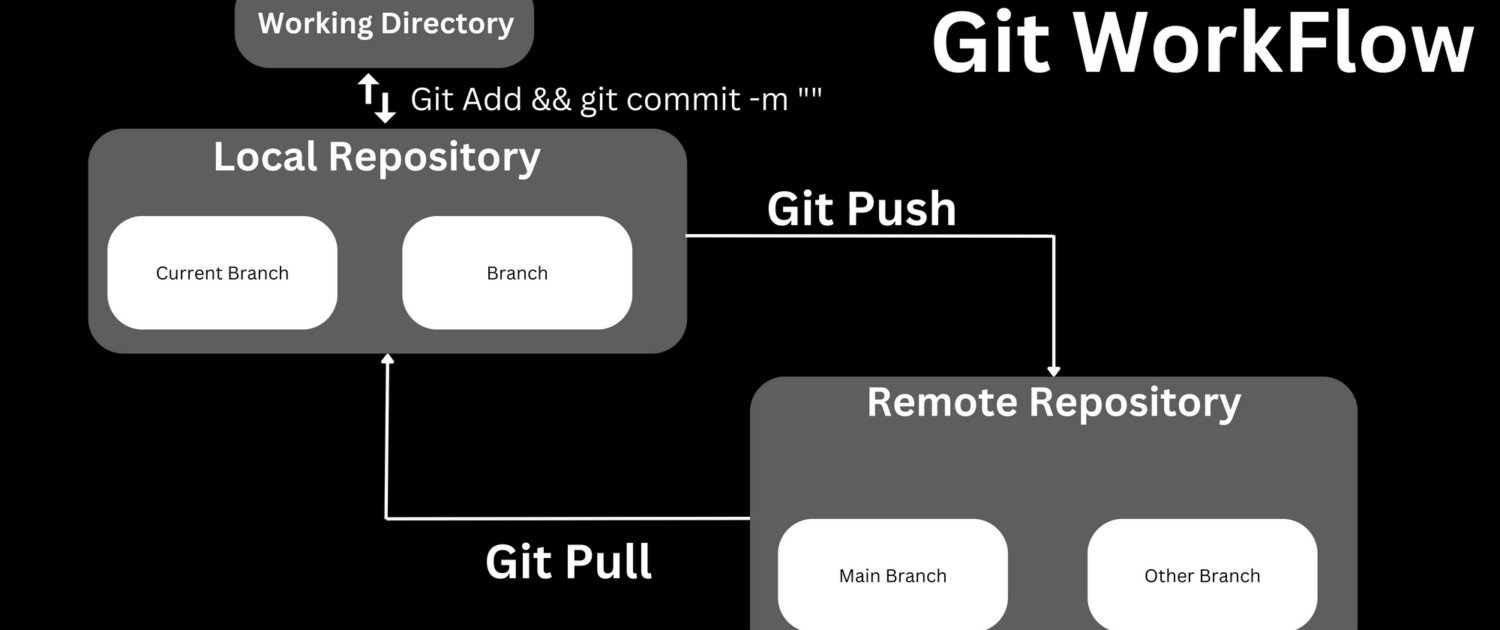
πŸ”§ Basic Git Workflow (Easy Steps)

1. Create or open project folder

2. Initialize Git

3. Make code changes

4. Save changes (commit)

5. Push code to GitHub


πŸ”‘ Common Git Commands (With Simple Meaning)

1️⃣ Initialize Git

git init

πŸ‘‰ Starts Git in your project folder


2️⃣ Check File Status

git status

πŸ‘‰ Shows changed, new, or saved files


3️⃣ Add Files to Staging

git add .

πŸ‘‰ Tells Git: β€œThese files are ready to save”


4️⃣ Save Changes (Commit)

git commit -m “Initial commit”

πŸ‘‰ Saves your changes with a message


5️⃣ Connect GitHub Repository

git remote add origin repository_url

πŸ‘‰ Connects local project to GitHub


6️⃣ Upload Code to GitHub

git push origin main

πŸ‘‰ Sends your code to GitHub


πŸ” GitHub Daily Use Commands

git pull β†’ Download latest code

git clone β†’ Copy project from GitHub

git log β†’ View commit history


🧠 Real Life Example

Imagine you are writing a project:

Day 1 β†’ Working code

Day 2 β†’ Code breaks

Day 3 β†’ You panic

With Git: You simply go back to Day 1 code

That’s why Git is very powerful.


Conclusion

Git and GitHub are must-learn tools for every developer.They help us:

Manage code properly

Work in teams

Build professional projects

Learning Git early makes you a better and confident developer πŸ’»


My GitHub URL :-https://github.com/ThakarShivam175