JavaScript OOPS – Object Oriented Programming System


πŸ“˜ What is OOPS?

  • OOPS stands for Object Oriented Programming System.
  • In simple words, OOPS is a way of writing code where we group data and functions together using objects.

πŸ‘‰ OOPS helps us write clean, organized, and reusable code.


πŸ”Ή Why Use OOPS in JavaScript?

βœ… Code becomes easy to manage

βœ… Reusability of code

βœ… Better structure

βœ… Used in real-world projects

βœ… Makes applications scalable


πŸ”Ή What is an Object?

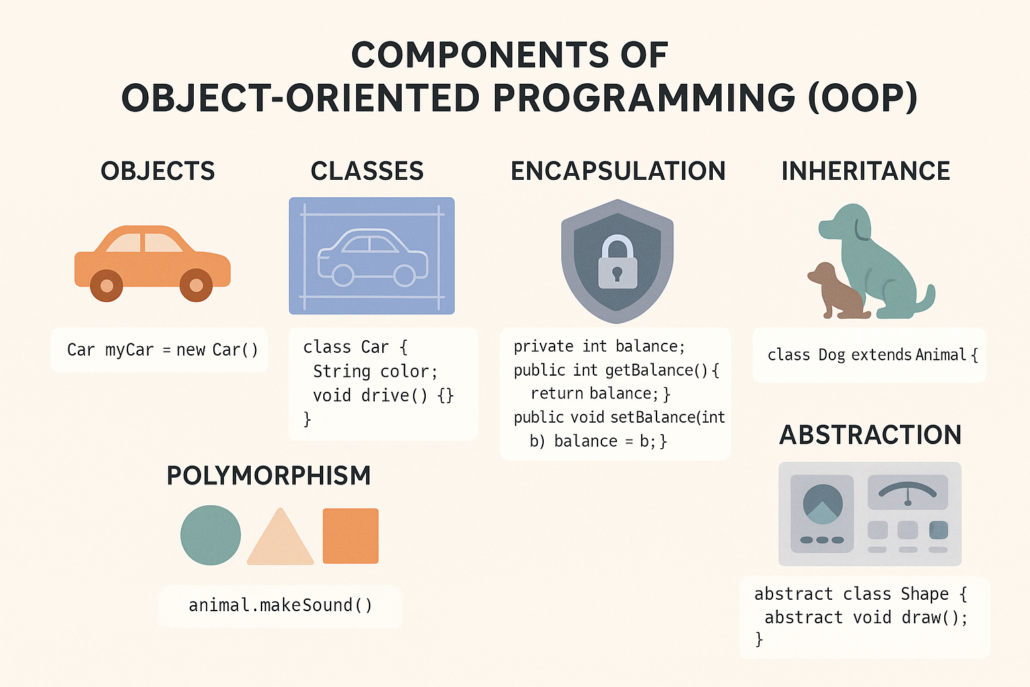
  • An object is a real-world entity.

Example:

  • Car
  • Student
  • User
Example Object in JavaScript
let user = {
name: “Shivam”,
age: 21
};
πŸ”Ή What is a Class?

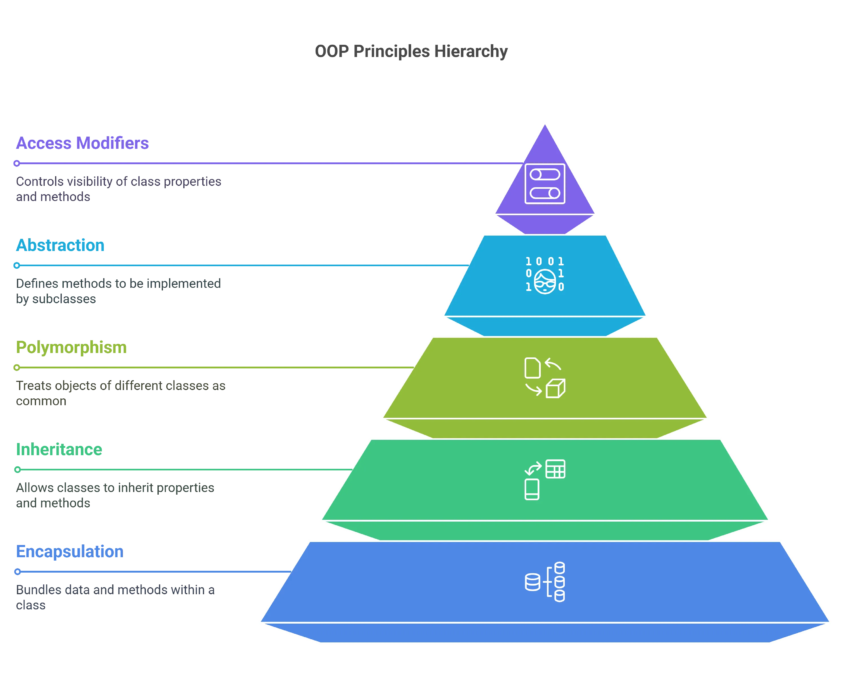
  • A class is a blueprint of an object.
  • In simple words, a class defines how an object will look and behave.


Example Class in JavaScript
class User {
constructor(name, age) {
this.name = name;
this.age = age;
}
}


πŸ”Ή What is Constructor?

  • A constructor is a special function that runs automatically when an object is created.


Constructor Example
class User {
constructor(name) {
this.name = name;
}
}
let u1 = new User(“Shivam”);


πŸ”Ή What is Inheritance?

  • Inheritance means one class uses properties of another class.

πŸ‘‰ Child class inherits from parent class.


Inheritance Example
class Person {
greet() {
console.log(“Hello”);
}
}
class Student extends Person {}
let s1 = new Student();
s1.greet();


πŸ”Ή What is Encapsulation?

  • Encapsulation means hiding data and showing only required information.
  • It helps protect data.
  • (Simple explanation is enough for beginners)


πŸ”Ή What is Polymorphism?

  • Polymorphism means same function name, different behavior.
  • It improves flexibility in code.

πŸ”Ή Advantages of JavaScript OOPS

  • Cleaner code
  • Easy debugging
  • Reusable components
  • Better project structure


πŸ“Œ Conclusion

  • JavaScript OOPS helps us write professional-level code.
  • Using:
  • Class
  • Object
  • Constructor
  • Inheritance

HTML Basics – Structure of a Web Page


πŸ“˜ What is HTML?

HTML stands for HyperText Markup Language.
HTML is used to create the structure of a website.

In simple words, HTML tells the browser:

  • What is heading
  • What is paragraph
  • What is image
  • What is form

πŸ‘‰ HTML is the skeleton of a website.

πŸ”Ή Common HTML Tags

  • <h1> to <h6> – Headings
  • <p> – Paragraph
  • <a> – Link
  • <img> – Image
  • <div> – Container
  • <form> – Form


πŸ”Ή Simple HTML Example

<h1>Welcome</h1>
<p>This is my first website</p>

πŸ”Ή Why HTML is Important?

  • Creates page structure
  • Easy to learn
  • Required for all websites
  • Works with CSS & JavaScript

CSS Basics – Styling the Web Page


πŸ“˜ What is CSS?

CSS stands for Cascading Style Sheets.
CSS is used to design and style the website.

In simple words, CSS makes websites:

  • Colorful
  • Beautiful
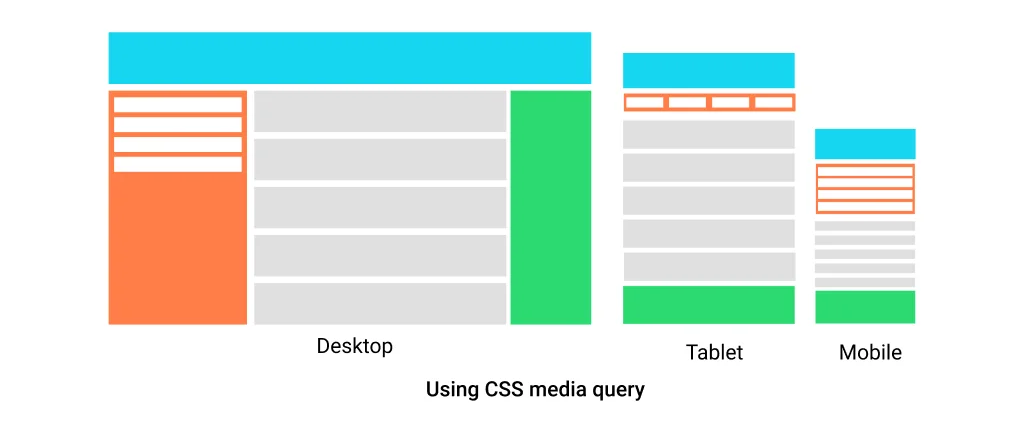
  • Responsive

πŸ”Ή What CSS Can Do?

  • Change colors
  • Change fonts
  • Add spacing
  • Create layouts
  • Make website responsive


πŸ”Ή Simple CSS Example

h1 {
color: blue;
text-align: center;
}


πŸ”Ή Types of CSS

1️⃣ Inline CSS
2️⃣ Internal CSS
3️⃣ External CSS (recommended)


πŸ”Ή Why CSS is Important?

Makes website attractive

Improves user experience

Helps in responsive design


JavaScript Basics – Making Websites Interactive


πŸ“˜ What is JavaScript?

JavaScript is a programming language for the web.
JavaScript makes websites interactive and dynamic.

In simple words, JavaScript adds:

  • Logic
  • Actions
  • Behavior

πŸ”Ή What JavaScript Can Do?

Show alerts

Validate forms

Handle button clicks

Change content dynamically

Call APIs


πŸ”Ή Simple JavaScript Example

alert(“Hello World”);


πŸ”Ή JavaScript Used For

  • Login validation
  • Form validation
  • Dynamic content
  • Animations
  • API calls

πŸ”— My Project Link:

πŸ‘‰ HTML/CSS/JS Project:
https://thakarshivam175.github.io/Sundown-studio/

Β Conclusion:

  • HTML, CSS, and JavaScript are the core technologies of web development.
  • HTML β†’ Structure
  • CSS β†’ Design
  • JavaScript

Motto: Client wants to change the layout of single product page of Woocommerce, the challenge is when we upgrade the Woocommerce plugin, it will overwrite all the code files so customization will be removed. So we need to find out the way by which we can customize the Woocommerce & we can upgrade it by just once click from WordPress back end.
Read more

There are a plenty of plateforms / technology available to start your website but which is best for you ? here’s possibly the most comprehensive guide ever.

What needs to be considerd before you choose the platform ?

  1. Cost
  2. Easy
  3. Scalability
  4. Performance
  5. Compatibility
  6. Advantages
  7. Disadvantages

Read more

In the last 10 years the world has changed beyond our expectations.

It will be hard to believe that The technology that we are using now are not aged more than 12years. For example smart-phones and ATM’s. And they became a part of our life in a short period of time.

The words which we are heard frequently nowadays is

    1. Virtual reality (Oculus rift and HTC vive) : We can expect VR system will become more popular in coming years.

Read more