AJAX Basics – Load Data Without Refreshing the Page


πŸ“˜ What is AJAX?

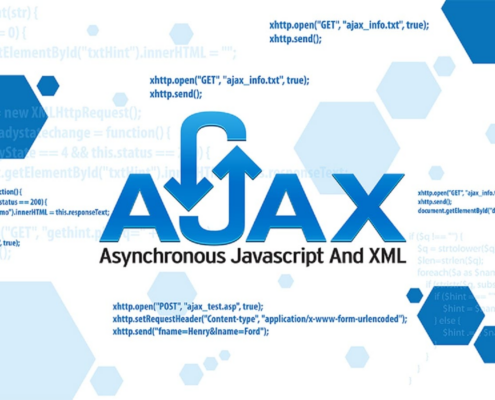
  • AJAX stands for Asynchronous JavaScript and XML.
  • In simple words, AJAX allows us to send and receive data from server without reloading the web page.

πŸ‘‰ The page stays the same, only data changes.
πŸ”Ή Why Use AJAX?

βœ… No page reload

βœ… Faster response

βœ… Better user experience

βœ… Smooth website interaction


πŸ”Ή Where AJAX is Used?

  • Login systems
  • Search suggestions
  • Live form validation
  • Weather apps
  • Chat applications


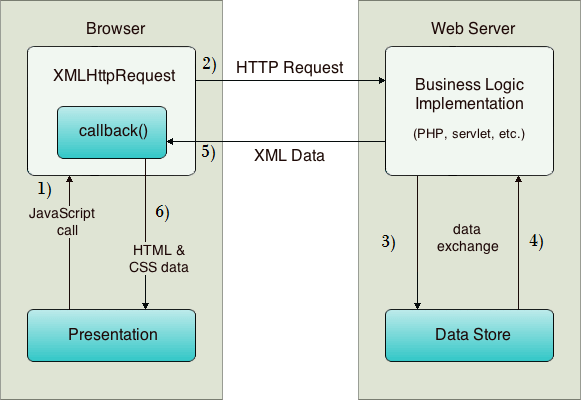
πŸ”§ How AJAX Works (Easy Steps)

1️⃣ User performs an action (click / submit)
2️⃣ JavaScript sends request to server
3️⃣ Server sends data back
4️⃣ Page updates without reload


πŸ”Ή Simple AJAX Example (Using Fetch)

fetch(“data.json”)
.then(response => response.json())
.then(data => {
console.log(data);
});
βœ… What is an API?

  • API stands for Application Programming Interface.
  • In simple words, an API is a bridge that helps two applications talk to each other

πŸ‘‰ Example:

  1. Weather app gets data from weather server
  2. Payment app talks to bank server

πŸ”Ή Real Life Example of API

  • Google Maps
  • Weather apps
  • Payment gateways
  • Login with Google/Facebook.


πŸ”Ή API Call Example

fetch(“https://api.example.com/data”)
.then(response => response.json())
.then(result => {
console.log(result);
});

πŸ”Ή Display API Data on Page

fetch(“https://api.example.com/data”)
.then(res => res.json())
.then(data => {
document.getElementById(“output”).innerHTML = data.name;

});
 

πŸ”Ή Types of API Requests

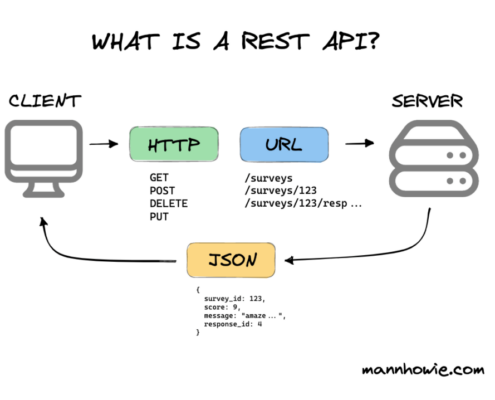
  1. GET β†’ Get data
  2. POST β†’ Send data
  3. PUT β†’ Update data
  4. DELETE β†’ Delete data

Advantages of AJAX & API

  1. Faster websites
  2. No full page reload
  3. Dynamic content
  4. Better user experience

πŸ”— My AJAX & API Project

πŸ‘‰ Live Project Link:
https://thakarshivam175.github.io/Currency-Converter/

https://thakarshivam175.github.io/Weather-App-by-SHIVAM/

πŸ“Œ Conclusion

  • AJAX and API help us create modern and dynamic websites.
  • AJAX β†’ Handles background requests
  • API β†’ Provides data


Bootstrap Basics – Build Responsive Websites Faster


πŸ“˜ What is Bootstrap?

  • Bootstrap is a CSS framework.
  • In simple words, Bootstrap gives us ready-made CSS classes so we don’t have to write CSS again and again.

πŸ‘‰ Bootstrap helps us create responsive websites quickly.


πŸ”Ή Why Use Bootstrap?

βœ… Fast development

βœ… Mobile-first design

βœ… Pre-built components

βœ… Easy to learn

βœ… Responsive by default


πŸ”Ή Bootstrap Features

  • Grid system
  • Buttons
  • Navbar
  • Forms
  • Cards
  • Modals


πŸ”Ή Bootstrap Grid System (Easy)

Bootstrap divides screen into 12 columns.

Example:

<div class=”row”>
<div class=”col-md-6″>Left</div>
<div class=”col-md-6″>Right</div>
</div>


πŸ”Ή Bootstrap Button Example

<button class=”btn btn-primary”>Click Me</button>


πŸ”Ή When to Use Bootstrap?

  • College projects
  • Admin panels
  • Fast UI design
  • Beginner projects


Tailwind CSS Basics – Utility First CSS Framework


πŸ“˜ What is Tailwind CSS?

  • Tailwind CSS is a utility-first CSS framework.
  • In simple words, Tailwind lets us style directly in HTML using classes.

πŸ‘‰ We don’t write CSS files again and again.


πŸ”Ή Why Use Tailwind CSS?

βœ… Custom design

βœ… Fast styling

βœ… No unused CSS

βœ… Modern UI

βœ… Highly flexible


πŸ”Ή Tailwind CSS Example

<button class=”bg-blue-500 text-white px-4 py-2 rounded”>
Click Me
</button>


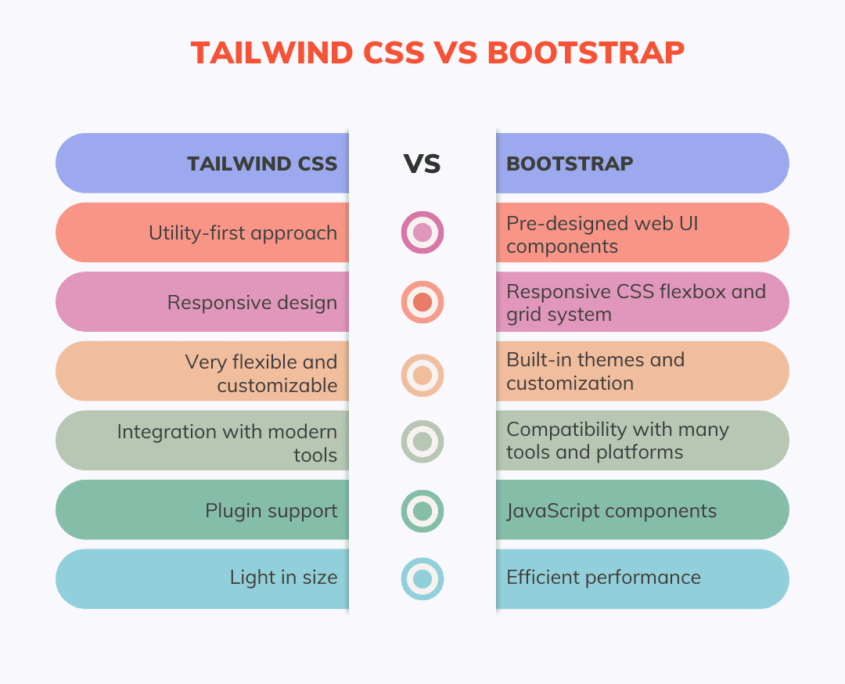
πŸ”Ή Tailwind vs Bootstrap (Easy)

Bootstrap Tailwind

Pre-designed components Utility classes
Less customization Full customization
Faster for beginners Better for custom UI

πŸ”Ή When to Use Tailwind?

  • Custom design projects
  • Modern websites
  • React / Vue projects
  • Professional UI work


πŸ”— My Project Links

πŸ‘‰ Bootstrap Project:
https://silver-flan-41aaed.netlify.app/


πŸ‘‰ Tailwind Project:
https://thakarshivam175.github.io/tailwindcss/


πŸ“Œ Conclusion

  • Bootstrap and Tailwind CSS both help in faster web design.
  • Bootstrap β†’ Quick & easy
  • Tailwind β†’ Custom & modern

1. Git Basics

πŸ”Ή What is Git?

Git is a version control system.
In simple words, Git remembers every change you make in your code.

If:

Your code breaks.

You delete something by mistake.


πŸ”Ή Why Git is Important?

Git is important because:

βœ… Keeps backup of your code

βœ… Tracks who changed what and when

βœ… Helps in team work

βœ… Saves project history

βœ… Used by almost all companies


πŸ”Ή What is GitHub?

GitHub is an online platform where we store Git projects on the internet.

In simple words:

Git β†’ works on your computer

GitHub β†’ stores your code online

Using GitHub, you can:

Share code with others

Show your work to companies

Work with team members


πŸ”Ή Difference Between Git and GitHub

Works locally Works online
Tracks code changes Stores code
Command-line tool Website
No internet needed Internet required


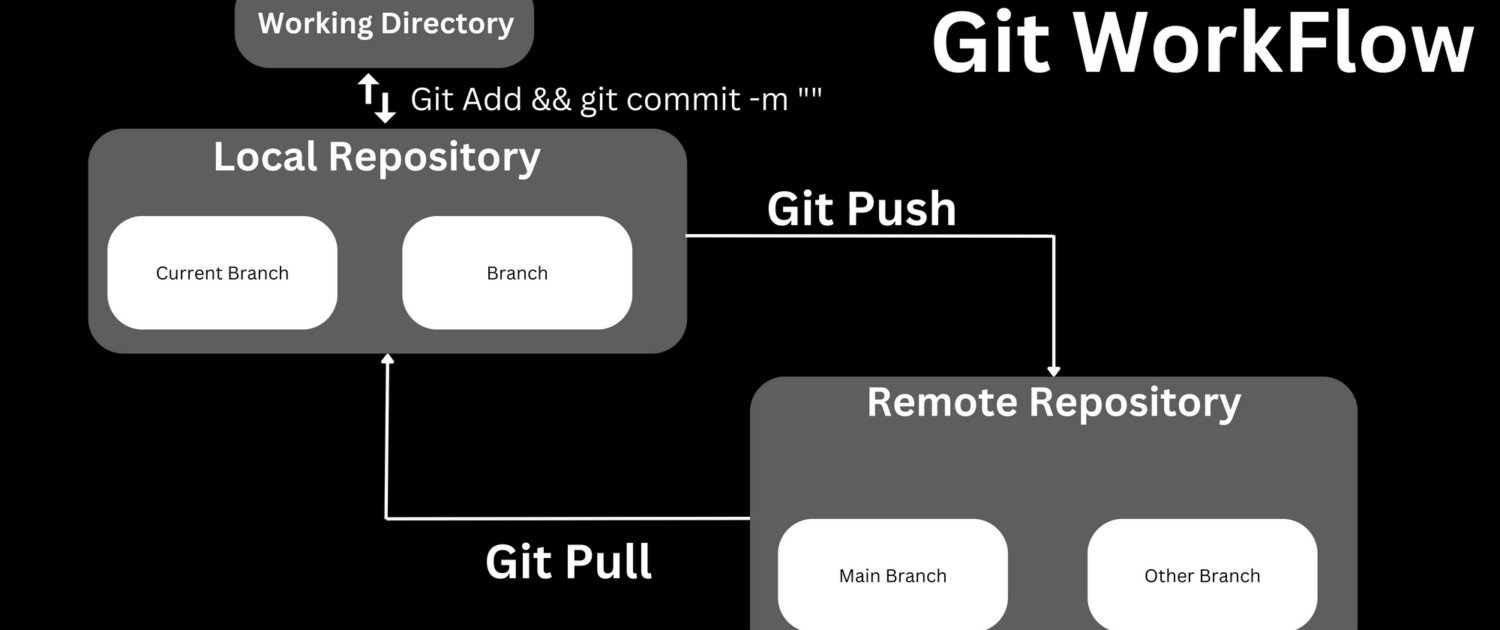
πŸ”§ Basic Git Workflow (Easy Steps)

1. Create or open project folder

2. Initialize Git

3. Make code changes

4. Save changes (commit)

5. Push code to GitHub


πŸ”‘ Common Git Commands (With Simple Meaning)

1️⃣ Initialize Git

git init

πŸ‘‰ Starts Git in your project folder


2️⃣ Check File Status

git status

πŸ‘‰ Shows changed, new, or saved files


3️⃣ Add Files to Staging

git add .

πŸ‘‰ Tells Git: β€œThese files are ready to save”


4️⃣ Save Changes (Commit)

git commit -m “Initial commit”

πŸ‘‰ Saves your changes with a message


5️⃣ Connect GitHub Repository

git remote add origin repository_url

πŸ‘‰ Connects local project to GitHub


6️⃣ Upload Code to GitHub

git push origin main

πŸ‘‰ Sends your code to GitHub


πŸ” GitHub Daily Use Commands

git pull β†’ Download latest code

git clone β†’ Copy project from GitHub

git log β†’ View commit history


🧠 Real Life Example

Imagine you are writing a project:

Day 1 β†’ Working code

Day 2 β†’ Code breaks

Day 3 β†’ You panic

With Git: You simply go back to Day 1 code

That’s why Git is very powerful.


Conclusion

Git and GitHub are must-learn tools for every developer.They help us:

Manage code properly

Work in teams

Build professional projects

Learning Git early makes you a better and confident developer πŸ’»


My GitHub URL :-https://github.com/ThakarShivam175