
Css FrameWork :- BootStrap & Tailwind Css
Bootstrap Basics – Build Responsive Websites Faster
📘 What is Bootstrap?
- Bootstrap is a CSS framework.
- In simple words, Bootstrap gives us ready-made CSS classes so we don’t have to write CSS again and again.
👉 Bootstrap helps us create responsive websites quickly.
🔹 Why Use Bootstrap?
✅ Fast development
✅ Mobile-first design
✅ Pre-built components
✅ Easy to learn
✅ Responsive by default
🔹 Bootstrap Features
- Grid system
- Buttons
- Navbar
- Forms
- Cards
- Modals
🔹 Bootstrap Grid System (Easy)
Bootstrap divides screen into 12 columns.
Example:
<div class=”row”>
<div class=”col-md-6″>Left</div>
<div class=”col-md-6″>Right</div>
</div>
🔹 Bootstrap Button Example
<button class=”btn btn-primary”>Click Me</button>
🔹 When to Use Bootstrap?
- College projects
- Admin panels
- Fast UI design
- Beginner projects
Tailwind CSS Basics – Utility First CSS Framework
📘 What is Tailwind CSS?
- Tailwind CSS is a utility-first CSS framework.
- In simple words, Tailwind lets us style directly in HTML using classes.
👉 We don’t write CSS files again and again.
🔹 Why Use Tailwind CSS?
✅ Custom design
✅ Fast styling
✅ No unused CSS
✅ Modern UI
✅ Highly flexible
🔹 Tailwind CSS Example
<button class=”bg-blue-500 text-white px-4 py-2 rounded”>
Click Me
</button>
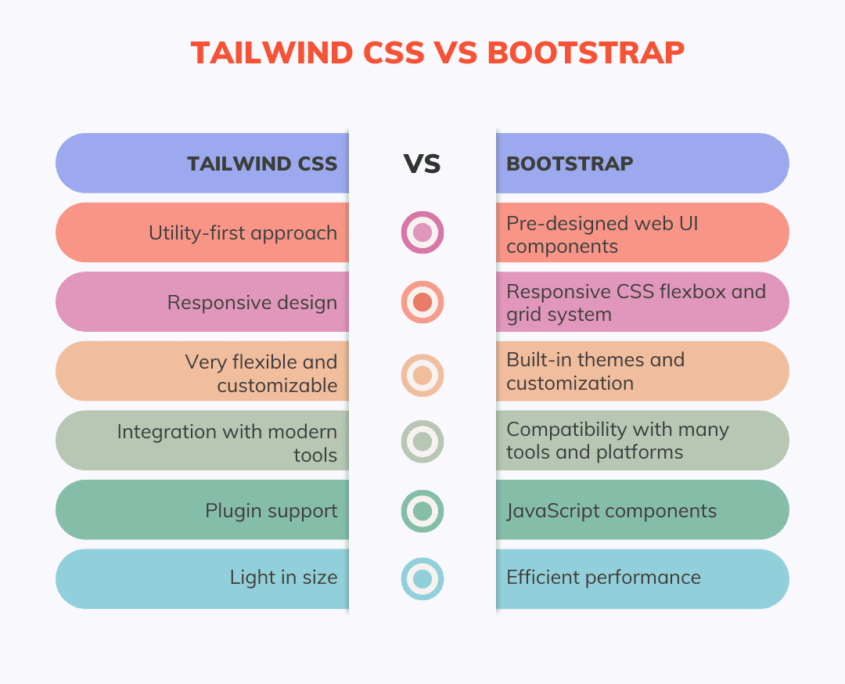
🔹 Tailwind vs Bootstrap (Easy)
Bootstrap Tailwind
Pre-designed components Utility classes
Less customization Full customization
Faster for beginners Better for custom UI
🔹 When to Use Tailwind?
- Custom design projects
- Modern websites
- React / Vue projects
- Professional UI work
🔗 My Project Links
👉 Bootstrap Project:
https://silver-flan-41aaed.netlify.app/


👉 Tailwind Project:
https://thakarshivam175.github.io/tailwindcss/
📌 Conclusion
- Bootstrap and Tailwind CSS both help in faster web design.
- Bootstrap → Quick & easy
- Tailwind → Custom & modern


Leave a Reply
Want to join the discussion?Feel free to contribute!