
How to Use Git & GitHub – Beginner Friendly Guide

1. Git Basics
🔹 What is Git?
Git is a version control system.
In simple words, Git remembers every change you make in your code.
If:
Your code breaks.
You delete something by mistake.
🔹 Why Git is Important?
Git is important because:
✅ Keeps backup of your code
✅ Tracks who changed what and when
✅ Helps in team work
✅ Saves project history
✅ Used by almost all companies
🔹 What is GitHub?
GitHub is an online platform where we store Git projects on the internet.
In simple words:
Git → works on your computer
GitHub → stores your code online
Using GitHub, you can:
Share code with others
Show your work to companies
Work with team members
🔹 Difference Between Git and GitHub
Works locally Works online
Tracks code changes Stores code
Command-line tool Website
No internet needed Internet required
🔧 Basic Git Workflow (Easy Steps)
1. Create or open project folder
2. Initialize Git
3. Make code changes
4. Save changes (commit)
5. Push code to GitHub
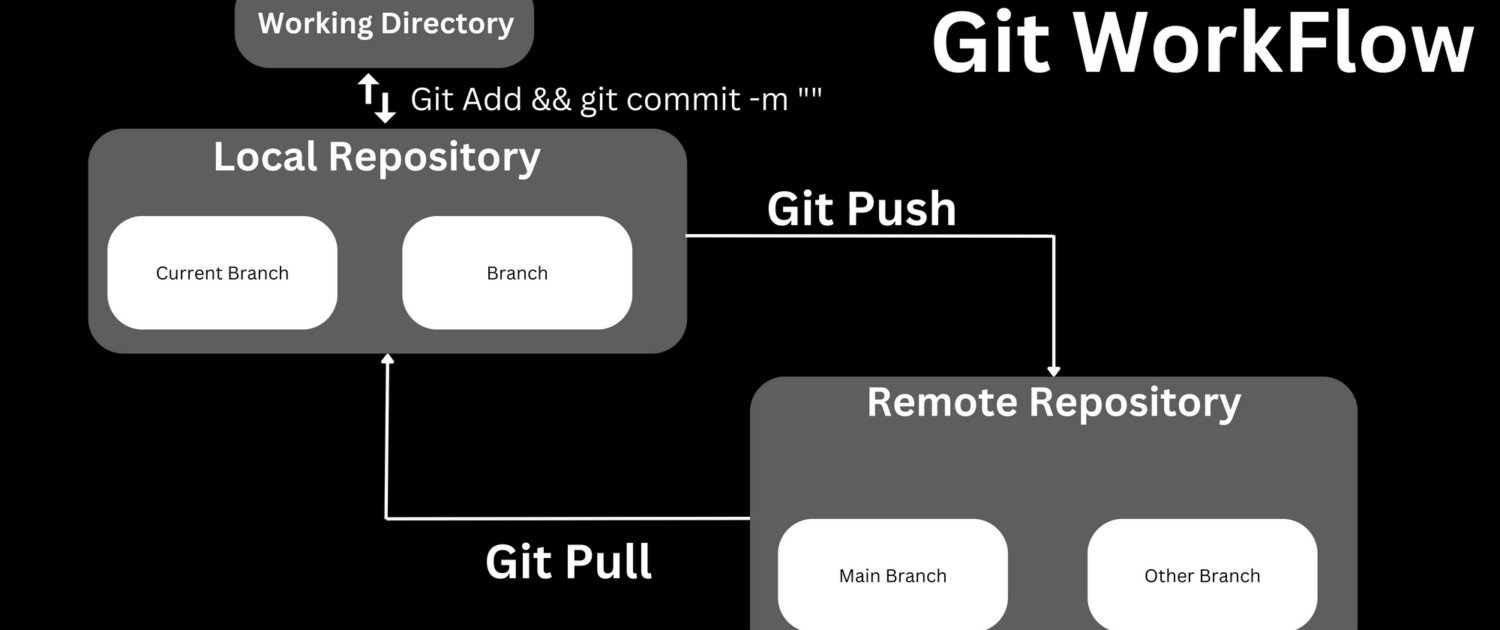
🔑 Common Git Commands (With Simple Meaning)
1️⃣ Initialize Git
git init
👉 Starts Git in your project folder
2️⃣ Check File Status
git status
👉 Shows changed, new, or saved files
3️⃣ Add Files to Staging
git add .
👉 Tells Git: “These files are ready to save”
4️⃣ Save Changes (Commit)
git commit -m “Initial commit”
👉 Saves your changes with a message
5️⃣ Connect GitHub Repository
git remote add origin repository_url
👉 Connects local project to GitHub
6️⃣ Upload Code to GitHub
git push origin main
👉 Sends your code to GitHub
🔁 GitHub Daily Use Commands
git pull → Download latest code
git clone → Copy project from GitHub
git log → View commit history
🧠 Real Life Example
Imagine you are writing a project:
Day 1 → Working code
Day 2 → Code breaks
Day 3 → You panic
With Git: You simply go back to Day 1 code
That’s why Git is very powerful.
Conclusion
Git and GitHub are must-learn tools for every developer.They help us:
Manage code properly
Work in teams
Build professional projects
Learning Git early makes you a better and confident developer 💻
My GitHub URL :-https://github.com/ThakarShivam175
 ci-version-3-4
Leave a Reply
Want to join the discussion?Feel free to contribute!