
AJAX Basics – Load Data Without Refreshing the Page
📘 What is AJAX?
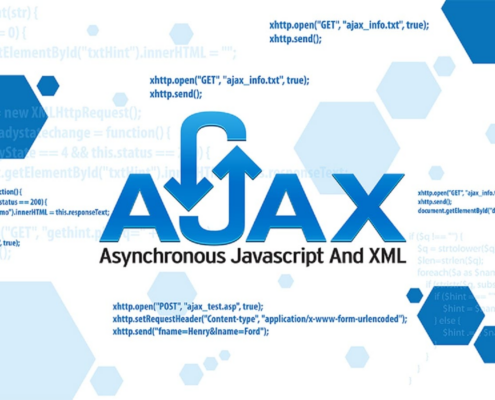
- AJAX stands for Asynchronous JavaScript and XML.
- In simple words, AJAX allows us to send and receive data from server without reloading the web page.
👉 The page stays the same, only data changes.
🔹 Why Use AJAX?
✅ No page reload
✅ Faster response
✅ Better user experience
✅ Smooth website interaction
🔹 Where AJAX is Used?
- Login systems
- Search suggestions
- Live form validation
- Weather apps
- Chat applications
🔧 How AJAX Works (Easy Steps)
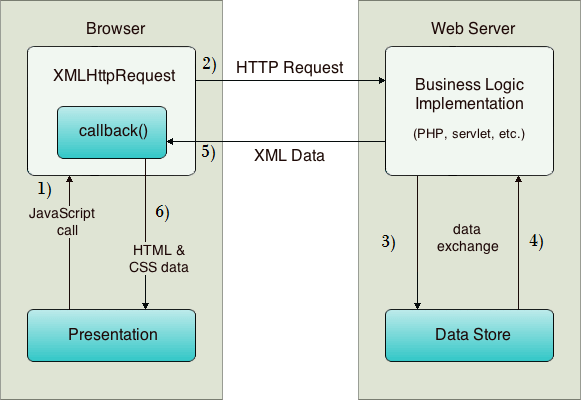
1️⃣ User performs an action (click / submit)
2️⃣ JavaScript sends request to server
3️⃣ Server sends data back
4️⃣ Page updates without reload
🔹 Simple AJAX Example (Using Fetch)
fetch(“data.json”)
.then(response => response.json())
.then(data => {
console.log(data);
});
✅ What is an API?
- API stands for Application Programming Interface.
- In simple words, an API is a bridge that helps two applications talk to each other
👉 Example:
- Weather app gets data from weather server
- Payment app talks to bank server
🔹 Real Life Example of API
- Google Maps
- Weather apps
- Payment gateways
- Login with Google/Facebook.
🔹 API Call Example
fetch(“https://api.example.com/data”)
.then(response => response.json())
.then(result => {
console.log(result);
});
🔹 Display API Data on Page
fetch(“https://api.example.com/data”)
.then(res => res.json())
.then(data => {
document.getElementById(“output”).innerHTML = data.name;
});
🔹 Types of API Requests
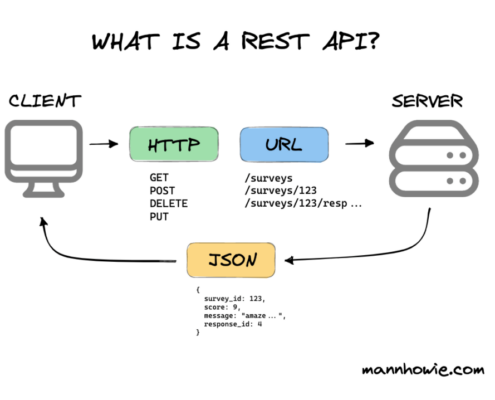
- GET → Get data
- POST → Send data
- PUT → Update data
- DELETE → Delete data
Advantages of AJAX & API
- Faster websites
- No full page reload
- Dynamic content
- Better user experience
🔗 My AJAX & API Project
👉 Live Project Link:
https://thakarshivam175.github.io/Currency-Converter/

https://thakarshivam175.github.io/Weather-App-by-SHIVAM/
📌 Conclusion
- AJAX and API help us create modern and dynamic websites.
- AJAX → Handles background requests
- API → Provides data